If you’re launching an online store in Austin and you’ve done any research at all, you’ve already run into this debate: Shopify or WooCommerce?
Both are legitimate platforms used by millions of businesses worldwide. Both can build you a great store. But they work very differently — and for Austin small businesses specifically, one will almost always be a better fit than the other based on your situation.
This guide gives you an honest, side-by-side comparison so you can make a confident decision before spending money on development.
What Is Shopify?
Shopify is a fully hosted e-commerce platform. You pay a monthly fee, and Shopify handles your hosting, security, software updates, and technical infrastructure. You focus entirely on running your store.
Everything lives inside Shopify’s ecosystem. You build your store using their tools, install apps from their marketplace, and pay Shopify directly for your subscription. You don’t touch a server.
Best known for: Ease of use, reliability, and fast setup.
What Is WooCommerce?
WooCommerce is a free plugin that turns a WordPress website into an online store. Unlike Shopify, WooCommerce doesn’t host anything — you need to set up your own hosting, install WordPress, then add WooCommerce on top of it.
The tradeoff is flexibility. Because WooCommerce runs on WordPress, you have complete control over your website — the design, the code, the content, the SEO, all of it. Nothing is locked inside a proprietary ecosystem.
Best known for: Flexibility, SEO control, and lower long-term cost.
The Core Difference (And Why It Matters for Austin Businesses)
Here’s the simplest way to think about it:
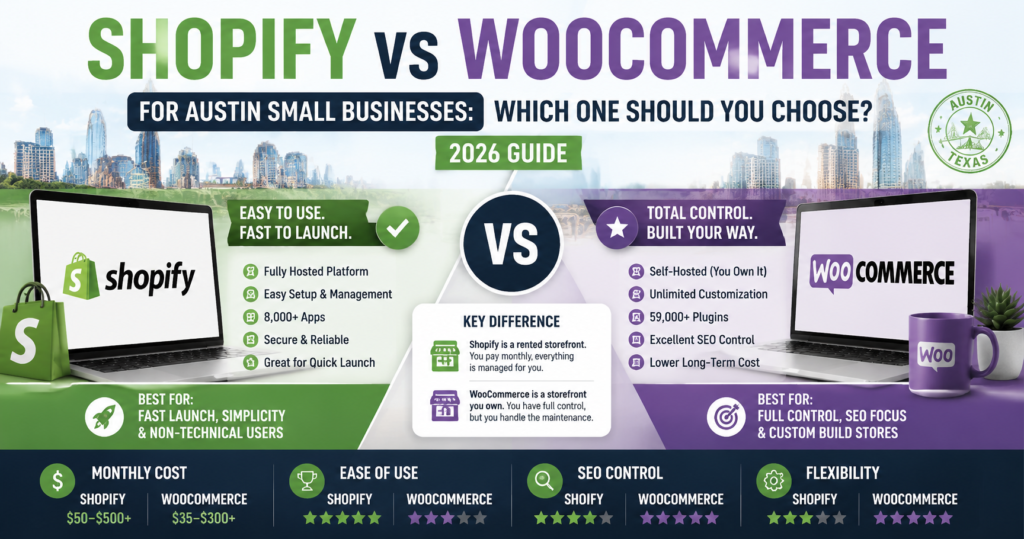
Shopify is a rented storefront. It’s professionally managed, always maintained, and everything works out of the box. But you’re working within Shopify’s rules, and you’re paying monthly for as long as your store exists.
WooCommerce is a storefront you own. You control everything, customize everything, and aren’t locked into anyone’s ecosystem. But you’re also responsible for maintaining it — or hiring someone who will.
For a busy Austin business owner who wants to sell products online without becoming a web developer, that distinction matters a lot.
Side-by-Side Comparison
| Feature | Shopify | WooCommerce |
|---|---|---|
| Hosting | Included | You arrange separately |
| Setup difficulty | Easy | Moderate to hard |
| Monthly platform cost | $39–$399/month | $0 (plugin is free) |
| Total monthly cost | $50–$500+ | $20–$200+ |
| Design flexibility | Good (with limits) | Very high |
| SEO control | Good | Excellent |
| App/plugin ecosystem | 8,000+ apps | 59,000+ plugins |
| Transaction fees | 0.5–2% (waived with Shopify Payments) | None |
| Maintenance responsibility | Shopify handles it | You or your developer |
| Scalability | High | Very high |
| Best for | Fast launch, simplicity | Full control, SEO, custom builds |
Cost Comparison: What You Actually Pay
Cost is one of the most misunderstood parts of this debate. WooCommerce is often called “free” — but that’s only the plugin itself.
Shopify Costs
- Platform: $39–$399/month (Shopify plan)
- Theme: $0 (free) or $170–$400 (premium, one-time)
- Apps: $50–$200/month for a standard setup
- Domain: ~$15/year
- Transaction fees: Waived if you use Shopify Payments
Realistic monthly cost for an Austin small business: $90–$400/month
WooCommerce Costs
- Plugin: Free
- Hosting: $15–$80/month (varies by provider and traffic)
- WordPress theme: $0–$100 (one-time)
- Plugins: $20–$150/month for equivalent features
- Domain: ~$15/year
- Developer maintenance: $50–$200/month if you hire someone
Realistic monthly cost for an Austin small business: $35–$300/month
WooCommerce can be cheaper in the long run — especially for stores that grow large — but it requires more upfront setup investment and ongoing maintenance attention.
SEO: WooCommerce Has a Clear Edge
If organic search traffic is important to your Austin business — and for most businesses it should be — this is the most important section.
WooCommerce runs on WordPress, which is the gold standard for SEO. You get complete control over every technical SEO element: URL structure, page speed optimization, schema markup, canonical tags, sitemaps, meta data, and more. Plugins like Rank Math and Yoast SEO give you granular control that most SEO professionals prefer.
Shopify’s SEO is solid and has improved significantly in recent years, but it has known limitations. URL structures are more rigid (blog posts always live under/blogs/, products under /products/), and some technical customizations require workarounds that a Shopify developer would need to implement.
For an Austin business trying to rank for local keywords like “handmade jewelry Austin TX” or “organic skincare Austin,” — where organic traffic could drive consistent free leads — WooCommerce gives you a stronger foundation.
Winner for SEO: WooCommerce
Ease of Use: Shopify Is Simpler
If you plan to manage your own store without a developer, Shopify is significantly easier to use day-to-day.
Adding products, updating inventory, processing orders, running discount codes, and reading your sales data are all straightforward inside Shopify’s dashboard. The interface is clean and designed for non-technical users.
WooCommerce has improved, but it lives inside WordPress — a platform with more moving parts. If something breaks (a plugin conflict, a hosting issue, a failed update), troubleshooting requires more technical knowledge or a developer on call.
For Austin business owners who want to focus on running their business rather than managing their website, Shopify removes a significant amount of friction.
Winner for ease of use: Shopify
Flexibility and Customization: WooCommerce Wins
WooCommerce has access to over 59,000 WordPress plugins — nearly eight times more than Shopify’s app marketplace. Whatever your store needs to do, there’s almost certainly a plugin for it.
More importantly, because WooCommerce is open source, a developer can build anything that doesn’t exist off the shelf. Custom product configurators, complex pricing rules, integration with local Austin POS systems, membership portals, subscription billing — all of it is possible without being constrained by platform limitations.
Shopify is also highly flexible, but at the edges of customization, it can hit walls. Certain design changes require editing Liquid (Shopify’s templating language), and some integrations that WooCommerce handles natively require paid Shopify apps.
Winner for flexibility: WooCommerce
Payment Processing
Both platforms support all major payment methods — credit cards, PayPal, Apple Pay, Google Pay, buy now pay later, and more.
The key difference is transaction fees. Shopify charges an additional fee (0.5% on Advanced, up to 2% on Basic) if you use a third-party payment processor instead of their own Shopify Payments. For a store doing $20,000/month in sales, that’s $100–$400/month in extra fees.
Using Shopify Payments eliminates these fees, and it’s available throughout the US, including Austin. The only reason to use a third-party processor is if you need a gateway that Shopify Payments doesn’t support.
WooCommerce has no built-in transaction fee on top of whatever your payment processor charges. You keep more of each sale.
Winner for payment costs: WooCommerce (slight edge)
Security and Maintenance
This is where Shopify’s model is genuinely valuable for busy business owners.
Shopify handles all security patches, software updates, server maintenance, SSL certificates, and uptime monitoring. Their platform has a 99.99% uptime record. You don’t think about any of this — it just works.
With WooCommerce, security is your responsibility. That means keeping WordPress, WooCommerce, and every plugin updated. Neglecting this is how sites get hacked — and a hacked WooCommerce store can cost you customer data, search rankings, and days of downtime. Many Austin business owners hire a maintenance service ($50–$150/month) to handle this, which is a smart move but adds to the cost.
Winner for low-maintenance operation: Shopify
Which One Is Right for Your Austin Business?
Here’s a simple decision guide based on the most common situations we see with Austin small businesses:
Choose Shopify if:
- You want to launch quickly (days or weeks, not months)
- You’re not technical and don’t want to be
- You’re starting with a small product catalog (under 100 products)
- You want predictable monthly costs with no surprise maintenance bills
- Your primary sales channel is social media or paid ads, not organic Google search
- You sell internationally and need multi-currency support out of the box
Choose WooCommerce if:
- You already have a WordPress website and want to add a store to it
- Long-term SEO and organic traffic are central to your business strategy
- You have complex product types, pricing rules, or custom requirements
- You want full ownership and control of your platform
- You’re working with a developer who can handle ongoing maintenance
- You’re planning a large catalog (500+ products) and want to avoid Shopify’s scaling costs
Still Not Sure?
If you’re genuinely torn, here’s the tiebreaker question: How important is SEO to your business in the next 12–24 months?
If your plan is to run paid ads and drive traffic through Instagram or Google Shopping, go Shopify. It’s simpler, faster, and more than capable.
If your plan is to rank organically for Austin-specific search terms, build content, and grow traffic without paying for every click, go with WooCommerce. The SEO advantages compound over time and will matter more and more as your business grows.
One More Thing: The Platform Matters Less Than the Build
The most common mistake Austin business owners make is spending too much time on this decision and not enough on finding the right person to build the store.
A poorly built Shopify store will underperform a well-built WooCommerce store every time — and vice versa. The platform sets the ceiling. The execution determines what you actually achieve.
Whichever platform you choose, make sure whoever builds your store understands mobile design, page speed, local SEO, and conversion optimization. Those factors will have far more impact on your revenue than the platform you pick.
Not sure which platform fits your Austin business? We work with both Shopify and WooCommerce and can give you an honest recommendation based on your specific goals and budget — no sales pitch. Reach out here, and we’ll get back to you within one business day.
Web Design Austin TX builds Shopify and WooCommerce stores for Austin small businesses. Every store is mobile-first, SEO-optimized, and built to convert visitors into customers.